
You go excitedly into the traffic tab in GA4 and here you see that the number of Unassigned is increasing month by month. It’s time to start looking for the answer to that tricky question of what’s actually behind this channel in Google Analytics 4.
Default channel group GA4
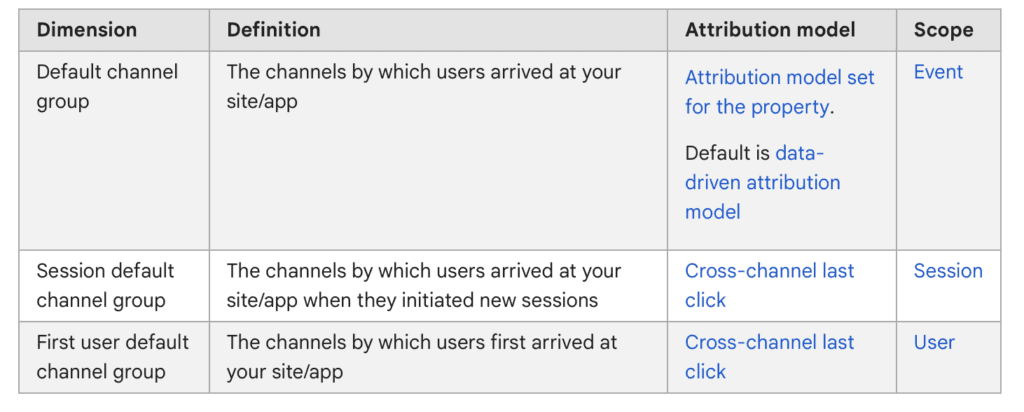
To start, let’s look at three different definitions of channel grouping to understand exactly what they refer to. This will also have an impact on the further quality of the conclusions.
- default channel group
- session default channel group
- first user default channel group
Google Analytics 4’s Default Channel Grouping uses predefined rules to categorize traffic by source and medium. This feature reveals where your website visitors originate and shows how they discover your content, providing valuable engagement insights across channels.
The Default Channel Grouping in GA4 includes the following channels:
- Organic Search: Traffic from organic search engine results pages (SERPs). This includes users who find your website through non-paid search listings on search engines like Google, Bing, etc.
- Direct: Traffic from users who visit your website directly by typing the URL into the browser, using bookmarks, or via untracked referral sources.
- Social: Traffic from social media platforms like Facebook, Twitter, LinkedIn, Instagram, etc.
- Email: Traffic from users who click on links within email campaigns that are tagged with UTM parameters or email attribution.
- Paid Search: Traffic from pay-per-click (PPC) advertising campaigns on search engines like Google Ads.
- Display: Traffic from display advertising, such as banner ads on various websites.
- Referral: Traffic from external websites that link to your website, excluding social media and search engines.
- Affiliates: Traffic from affiliate marketing efforts or partnerships.
- Other Advertising: Traffic from other advertising sources that don’t fall into the specific categories above.
- Other: Traffic from any sources that don’t fit into the predefined categories, which might include app traffic, some app-to-app referrals, or any other uncategorized sources.
Remember: Default Channel Grouping relies on source and medium data from incoming traffic. If you use custom UTM parameters or modified channel definitions in GA4, your groupings may differ from the default.
GA4’s Default Channel Grouping reveals your top-performing marketing channels by tracking traffic sources and engagement. These insights help optimize your marketing strategy with data-driven decisions.
The most common channel group:
- cross-network
- direct
- display
- organic search
- organic shopping
- organic social
- organic video
- paid social
- paid search
- paid shopping
- paid video
- referral
What does the Unassigned metric mean?
According to Google definition:
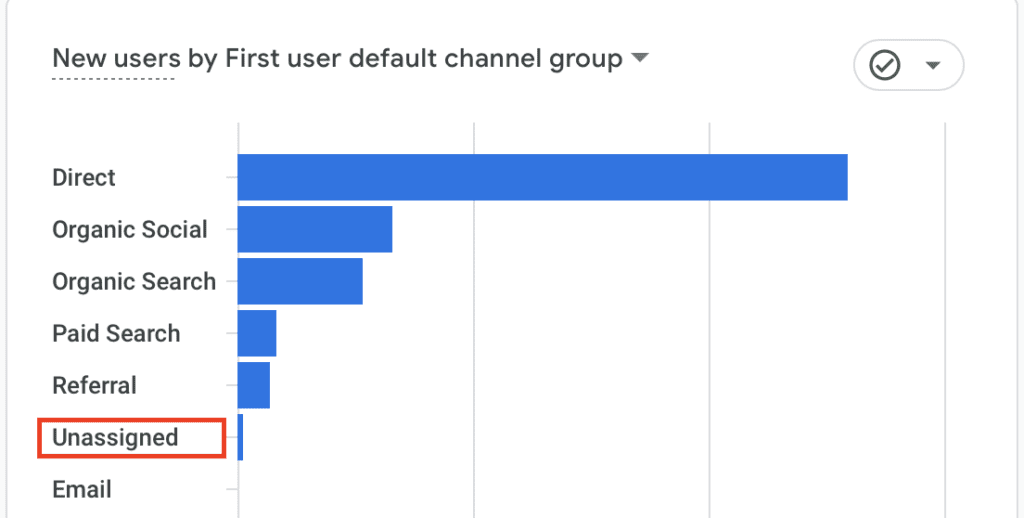
Unassigned is the value Analytics uses when there are no other channel rules that match the event data.
What could this mean? Overwhelmingly, it means that your users have not consented to cookies. Failure to accept analytics cookies will land them in this section.
Unassigned in Google Analytics
In Google Analytics, “unassigned” typically refers to data that cannot be attributed to a specific category or dimension. This can happen when certain tracking parameters or values are missing or not properly configured, leading to data being labeled as “unassigned” or “not set.”
Here are a few common scenarios where “unassigned” data might occur in Google Analytics:
- Unassigned Keywords: In the context of organic search traffic, if the search engine does not pass the keyword information (e.g., due to secure search or privacy settings), Google Analytics may label the organic search traffic as “(not provided)” or “unassigned” under the “Keywords” dimension.
- Unassigned Page URLs: If there is an issue with the tracking code or if the page URLs are not set correctly, Google Analytics might label the traffic data for certain pages as “unassigned” in reports.
- Unassigned Source/Medium: If the source or medium information is missing or not recognized by Google Analytics, traffic might be categorized as “unassigned” in the “Source/Medium” dimension.
- Unassigned Referral Traffic: If there are referral links directing traffic to your website, but the referrer information is not captured properly, Google Analytics might categorize the traffic as “unassigned” in the “Referral” dimension.
- Unassigned Campaign Parameters: If custom campaign tracking parameters (UTM parameters) are used incorrectly or are missing, Google Analytics may not be able to properly attribute traffic to specific campaigns, resulting in “unassigned” campaign data.
- Unassigned Events or Goals: If event tracking or goal tracking is set up incorrectly, or if users trigger events/goals without associated details, Google Analytics may categorize the data as “unassigned” in event or goal reports.
It’s crucial to address and resolve any instances of “unassigned” data in your Google Analytics reports to ensure accurate tracking and meaningful insights. Review your tracking implementation, check for any missing or misconfigured parameters, and make necessary adjustments to capture the data correctly. Always verify your UTM parameters in campaign URLs – proper setup ensures accurate campaign tracking in GA4.
Summary
The article discusses the Default Channel Grouping feature in Google Analytics 4, which allows marketers and analysts to categorize incoming traffic sources based on their channel type. This feature includes a new channel type called “Unassigned” that appears when a user does not accept consent mode, meaning their data cannot be used for analytics and marketing purposes. The article emphasizes the importance of properly categorizing traffic sources to gain insights into the effectiveness of different marketing channels, and provides tips on how to customize and configure the Default Channel Grouping feature in Google Analytics 4.
PS. Custom channel group in GA4 finally arrived!