
The bible of every marketer, Google Ads specialist, SEO specialist, and all other web analytics-based professions is Google Analytics. However, how not to be seduced by the so-called vanity metrics? Hundreds of views, low bounce rates, and an increasing number of pages per session can confuse our vigilance towards what is most important. Objective data analysis and interpretation of results consistent with reality. The idea is glorious and praiseworthy, so only the perennial question remains. Why do Google Ads and Google Analytics show different data? I invite you to read this post, in which I will try to elaborate a little bit on that.
Google Ads and Google Analytics discrepancies
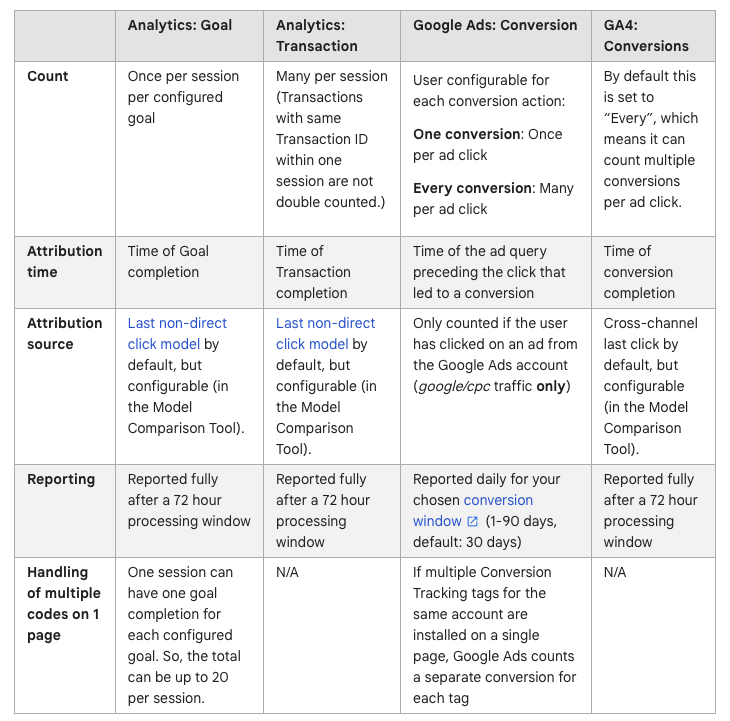
The table below shows the key differences in understanding the concept of “conversion” as a goal, transaction, or other defined event. It is worth bearing in mind the function of each of these tools. Google Ads is an advertising tool that is designed to support your marketing goals. Google Analytics plays the role of a business equivalent, which includes data on not only ads but also other channels and all the most important business indicators such as revenues, transactions, costs, average order value, or a customer’s purchase path. Below, I have listed some of the most important differences in the methods of interpreting key data by each of these tools. Feel free to read an official Google documentation.
- Number of conversions
- Moment of the purchase
- Attribution model
Google Ads
In the case of the data in the advertising panel, we have two options for taking our conversion: one or each. In the first case, Google recommends using this option in the case of contact forms, while the second will be perfect for taking into account each transaction, which in practice will be a purchase counted by Google Ads.
Moving smoothly to the next point, it is worth noting that Google Ads sees only the “advertising” world. This means a zero-one approach to a purchase or goal achievement. The moment of contact with the ad starts the customer’s shopping journey. Complications arise when other channels are involved. Google Analytics considers these channels to provide a fuller picture of ad effectiveness. A purchase decision may be influenced by several steps—watching a video, seeing a brand ad, and then encountering remarketing graphics. These steps can happen in sequence, but not necessarily. The result? Despite multiple touchpoints with the brand, the final credit often goes to Google Ads. This happens because the system doesn’t account for the other steps.
The said attribution model gives sleepless nights to many analysts, marketers, or accountants who nervously glance at the advertising panel and patiently explain the complexities of attribution, conversion, position, differences, and data…
In practice, it is quite complex to explain, but it is possible with a specific example. It is enough to mention a realistic example of a football team. Is one striker able to play a match on his own and claim 100% of the team’s credit? Is the successful or unsuccessful intervention of the goalkeeper proof of the incompetence or power of the entire team? Isn’t the coach who evaluates his players and decides their careers a key link to a well-functioning team?
Now, imagine our conversion is like a footballer with several paths to success. One path leads to completion, meaning the customer makes a purchase. It could be a direct shot at the goal (first click). Or it might be a team effort, with the final goal scored by one player (last click). Success can also come from good teamwork, where each player contributes (position-based). In a more complex case, the first player starts the play, confuses the rivals, and passes to the next player, who then passes to a teammate near the goal (linear attribution). Finally, the star player—the best, most experienced, and knowledgeable—gets all the credit. This idealized player represents data-based attribution, which is rare and hard to achieve.
Note: First click, linear, time decay, and position-based attribution models are going away
In nutshell, the assignment of a Google Ads transaction is fully dependent on the selected attribution model. On this basis, Google decides what percentage of a given shopping path participated in the entire purchasing process. Most accurately, all elements are reflected by data-based attribution, however, you need to meet several formal requirements in terms of, among others, the budget to be able to use it. On the other hand, taking into account the position is equally fair and values the individual elements of the purchasing path well (the first and last steps each have a 40% share, the remaining 20%).
Google Analytics
In Google Analytics, conversion is always a purchase, and in addition – in the last indirect click (which I will discuss in more detail in the section on attribution). This means that Google uses a very simple scheme to assess what was the source of the purchase, i.e. it takes into account the last click leading to the purchase, as long as it was not a direct input. In this way, Google Ads will recognize the moment of the actual click on the ad as a purchase, while Google Analytics will consider the moment of purchase.
In Google Analytics, a conversion is always a purchase. It also includes the last indirect click, which I will explain later in the attribution section. This means Google uses a simple method to determine the purchase source. It looks at the last click before the purchase, unless it was a direct visit. Google Ads credits the click on the ad as the purchase moment. Meanwhile, Google Analytics records the actual time of purchase.

The definition is simple: the indirect last click is the only attribution model Google Analytics recognizes. What does this mean in practice? The last click is the user’s final contact with any brand touchpoint. This is important because it doesn’t have to come from a single source, unlike in Google Ads. The user then moves between all channels, and his last move receives 100% of the transaction in the panel. In the case of a direct entry, i.e., after entering the URL address directly into the browser, the last step is skipped. According to official sources, it is not considered a touchpoint with the brand but a deliberate, intentional purchasing action.
Summary
This article does not cover all possibilities, exceptions, or reasons for discrepancies between Google Ads and Google Analytics. Keep in mind that these differences are often due to the complex setup options in Google Analytics. They also stem from the complexity of Google Ads conversions and other factors. I will cover these in the next section. Topics include assisted conversions, view-through conversions, phone calls from ads, and the number of goals per event.

The discrepancies between Google Ads and Google Analytics can arise due to several reasons:
- Date Ranges: Comparing long date ranges may include periods when your accounts weren’t linked.
- Multiple Accounts: Linking multiple Google Ads accounts to the same Analytics view can complicate the information in your reports.
- Filters: Filters may remove some of the data from your Analytics reports. It’s important to check that there are no filters editing your campaign final URLs.
- Data Import: Google Ads data is imported into Analytics at the time you view your report, so data is current as of the most recent hour.
- Different Calculations: Google Ads performs different calculations of the data than Analytics does, so you will see some differences even when the underlying data is the same.
- Attribution Differences: Google Ads and Analytics attribute conversions differently. Google Ads uses the last Google Ads click, but Analytics uses the last click across all channels.
- Transaction Dates: Google Ads and Analytics use different dates of transaction. Google Ads reports conversions against the date/time of the click that led to the conversion. Analytics uses the date/time of the conversion itself.
- Tracking Numbers: Google Ads conversion tracking numbers are usually reflected within 3 hours but typically within 9 hours from Analytics.
- Account-Level Tracking Differences: Google Ads tracking can be set up at either the individual account level or across multiple accounts. Analytics only tracks user behavior at the property level.
- Clicks and Sessions: Google Ads and Analytics count clicks and sessions differently. Google Ads tracks Clicks, while Analytics tracks Sessions.
- Invalid Clicks: Google Ads filters invalid clicks from your report. Analytics shows all data.
- Auto-Tagging: If auto-tagging is turned off, and you didn’t manually tag the final URLs with campaign tracking variables, the traffic isn’t marked as Google CPC.
- Server Side URL Rewrite: Adding additional parameters to your URL may cause your rewrite rule to break.
- Redirects: Redirects in landing pages can keep the Analytics code from launching and properly identifying the traffic as having come from a paid search campaign.
- Browser Preferences: Users might have set their browser preferences in ways that prevent Analytics used on websites from collecting data.
- Code Loading: Clicks reported on Google Ads but not on Analytics may be the result of an obstruction between the Google Ads click event and the ability to load the tracking code on the landing page.
- Returning Users: During the lifetime of a given campaign, a returning user to your site is attributed to that one campaign. In such cases, you can expect to see more sessions than clicks.
- Bookmarks: If users bookmark your website along with the gclid parameter, Analytics records traffic from these bookmarks arriving from your Google Ads ads. However, Google Ads doesn’t record the clicks.
- Server Delays: If a user comes to your site from an ad, and then leaves the landing page before the tracking code executes, then the gclid parameter is never passed to the Google servers, and that click isn’t associated with the session.
- Conversion Rate: In Analytics, Conversion Rate is the percentage of users that convert on at least one of the Goals you have defined for that view. This is different than the Google Ads Conversion Rate you see in your Google Ads account. In Google Ads, the Conversion Rate refers to the percent of clicks that end in a Google Ads conversion, as defined by the Google Ads Conversion Tracking code.
What data analysis problems do you encounter most often?