
When our desired website has already been created, we wait holding our breath for the moment when we will see it in the organic results after entering a given term in the search engine. However, we have been waiting for some time and there are still no results, so we are wondering if everything went as planned.
Of course, we can browse 87456784365243756249735673256976397 sites similar to ours every day and check if our site finally appears. However, there is a much simpler way and the golden method of marketers and positioners is a tool called Google Search Console. I will write a little about the magic and power of this tool in this article, but I encourage you to test my words in practice. Happy reading!
What is Google Search Console for?
In the simplest words, this tool allows us to monitor the position of our website on the internet. We can easily check how many clicks and views individual subpages had, as well as check whether they are indexed, i.e. visible to Google. Check official guidline about Google Search Console.
How to create an account for our website?
When we go through the initial settings, we have a choice of two windows to choose from:
- Service with the URL prefix – matches only one specific URL with the http prefix.
- Domain service – covers all domains and all protocols (with www, without, http, https). RECOMMENDED
Once we have created an account, it should be verified to confirm that the domain in question belongs to us and we have rights to it. We have several different options to choose from.
Website verification
- HTML file – a special code fragment associated with a specific user, it must be permanently uploaded, because the website verifies our ownership on its basis; this code includes an excerpt from Google-Site-Verification
- domain name – we verify ownership with the DNS record at the provider of our domain. Tedious and complicated, see below for simpler methods
- Google Analitycs tracking code – if you have an account in this tool from the same e-mail address, you can easily verify your site with Analitycs, NOTE_1 – if GA was uploaded using GTM or a plug-in, try another method; NOTE_2 – in GA4, the code is associated with the data stream
- Google Tag Manager code – the fastest and simplest form that works immediately after verification, under the condition that GTM has been uploaded to the website directly into the code of our website RECOMMENDED
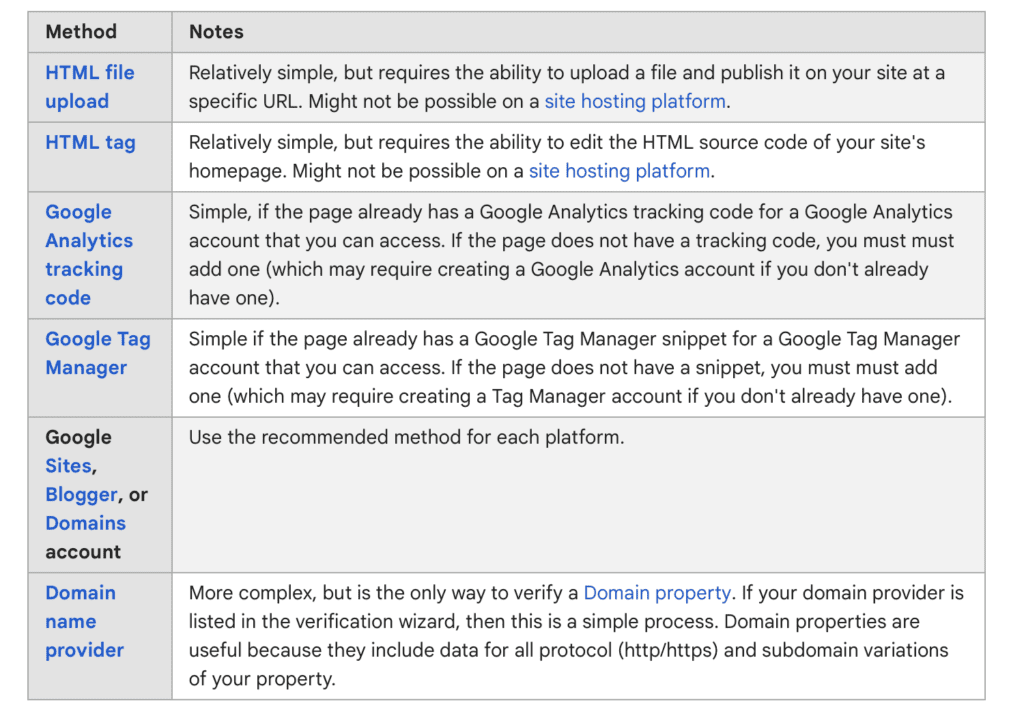
The methods described above are the most frequently mentioned and the easiest to configure yourself. There are other methods, but they are much more complicated and complex.
The most common errors during verification
- invalid tag – copy full name including all characters
- time limit has expired – check if there is space on the server and if it is not inactive
- error while checking the site – the verification code was not found, make sure that it is in the right place
- too many redirects – there is a loop on the website that continues to redirect (most often with incorrect implementation of SSL)
I hope that my guide has helped you in setting up a Google Search Console account, I wish you effective traffic analysis and visibility of your website!